WordPress® site infected with malware?
We clean it up in 6 hours.
We remove malware, backdoors and viruses
from your files, database and server
We work at the application and server level: where scanners and security plugins stop, we hunt down cron jobs, in-memory processes, SQL triggers and hidden persistence. Cleanup guaranteed within 6, 12 or 24 hours.
WORDPRESS SPECIALISTS.
FROM THE APPLICATION TO THE SERVER.
 WordPress
 WooCommerce
 Apache
 NGINX
 LiteSpeed
 PHP
 MySQL
A scanner that finds nothing
doesn’t mean
a clean site
or a secure server.
“In more than twenty years of hosting, we’ve seen “cleaned” sites get reinfected within hours. The security plugin reported zero threats, while a system cron job re-downloaded the backdoor every five minutes and a database trigger put the redirects back. Modern malware doesn’t live only in WordPress files.”

Managed Server S.r.l.
A deep cleanup,
done by hand and verified.
Many malware removal jobs stop at the files: they reinstall the core, delete the suspicious PHP files, run a scanner and call the site clean. But if the infection has taken root in the database, in cron jobs or in server processes, it will come back. Often overnight.
We work at both the application level and the server level: WordPress, themes, plugins and database on one side; crontabs, memory-resident processes, system users, web server configuration and logs on the other. That’s the reach of people who have run servers for twenty years, not just websites.
Our analysis is assisted by local open-weight AI models, such as Qwen and DeepSeek, running on our own infrastructure: they help us read thousands of lines of logs and classify never-before-seen obfuscated code, without your site’s data ever leaving our servers.
We remove the infection, close the door it came in through, and verify it doesn’t return.
What our customers
say about us.
A selection of public reviews of Managed Server, the hosting and systems company behind Malwarecleanup.com.
Swipe through the reviews or use the arrows.
“The level is high in terms of both skills and support.”
They tried Managed Server almost on a bet and found a high level of both systems expertise and customer support.
Read the review on Trustpilot“We have worked with Managed Server for years with excellent results!”
They run two workwear online stores and highlight the team’s technical know-how and the quality of the tools provided.
Read the review on Trustpilot“Clear, competent and professional”
A short, direct review of the consulting received, praised for its clarity, competence and professionalism.
Read the review on Trustpilot“A happy customer since 2016”
A long-standing relationship, with their main projects and most important clients entrusted to Managed Server.
Read the review on Trustpilot“Fast and professional.”
They describe a complex move to a new server, handled with optimizations along the way.
Read the review on Trustpilot“we have never had a security problem or attacks like before”
After moving their sites, a compromised site was recovered quickly without long downtime, and speed and security improved.
Read the review on Trustpilot“Marco has always been ready to step in”
A stable service, with very rare issues solved in no time whenever they came up.
Read the review on Trustpilot“an extremely competent technical staff”
The review focuses on prompt support and the team’s availability for businesses’ day-to-day needs.
Read the review on Trustpilot“Great Service and Excellent Support”
After several months, they highlight the quality of the performance and the availability of Managed Server’s support.
Read the review on Trustpilot“The best Italian hosting in every sense.”
After years of switching providers, they report support at any hour of the day or night, servers always up and very fast fixes.
Read the review on TrustpilotExcerpts and summaries of reviews of Managed Server group services, not results specific to this malware removal service.
All reviews ↗Removing the symptom
isn’t enough.
You have to find the cause.
A redirect, SEO spam or a Google warning is only the visible part. We look for the point of entry and every mechanism that lets the infection regenerate.
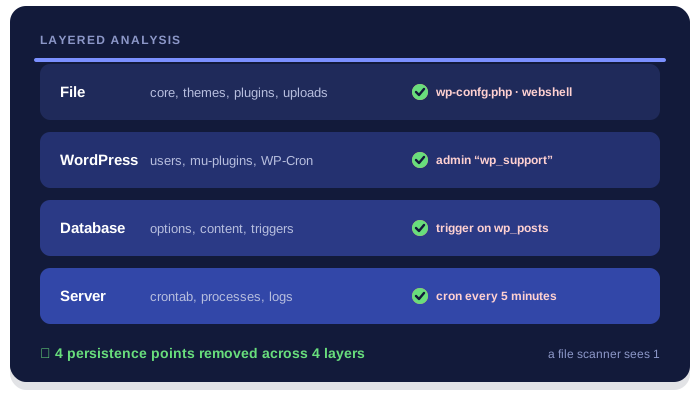
Same site.
Two levels of analysis.
A WordPress site is made of files, a database and a server that runs them. An infection can hide in any of these layers, which is why we analyze all of them in a single job.
Complete cleanup
Files, database, cron jobs, processes and users: we remove every component of the infection, not just the part you can see.
Entry point identified
We reconstruct from the logs how the attacker got in and close the hole: outdated plugins, credentials, uploads, permissions.
Your site, preserved
Content, orders and customizations stay where they are. No blind reinstalls that wipe out months of work.
Security plugins and scanners are useful tools, but they only see what WordPress can see: an in-memory process or a system crontab is beyond their reach.
Application and system.
Infections don’t respect boundaries.
Developers know WordPress. Sysadmins know the system. To truly clean a compromised site, you need to know and control both.
Code is only part of it.
A developer or agency works on themes, plugins and the database: they reinstall the core, compare files, look for suspicious code. These steps are necessary, but server access is often limited to FTP or the hosting control panel.
If the infection reactivates from a system cron job, from a process left in memory or from a file outside the document root, cleaning WordPress alone isn’t enough: the malware comes back.
The server is the other part.
A sysadmin checks processes, users, permissions, crontabs and web server logs. But telling a legitimate plugin from a tampered one, or spotting a payload hidden in a serialized option, takes deep knowledge of WordPress.
If the malicious code is inside a theme, in the wp_options table or in an SQL trigger, cleaning the system leaves the infection in the application.
One complete picture.
One coordinated cleanup.
We combine systems administration and WordPress development to follow the infection from the point of entry to the last persistence mechanism. We know how a vulnerable upload becomes a webshell, how the webshell creates a cron job, and how the cron job puts the code back into the database.
We work with Apache, NGINX and LiteSpeed, PHP-FPM and LSAPI, MySQL and MariaDB, on WordPress, WooCommerce and multisite. We verify every removal on the live system, not on a copy that doesn’t behave like production.
From file to process.
One single job.
Every infection has a chain. We follow it across every layer where it can hide, combining application and server analysis.
Files and code
under review.
We analyze core, themes, plugins, uploads and out-of-place files.
- Files obfuscated with base64 and gzinflate
- Code encrypted with ionCube, Zend Guard and SourceGuardian
- Hidden webshells and uploaders
- Ghost plugins and mu-plugins
Persistence
in the data.
We look for whatever regenerates the infection from inside MySQL and MariaDB.
- SQL triggers, procedures and events
- Payloads in wp_options and wp_posts
- Unauthorized administrators
- Malicious WP-Cron events
The server
under control.
We check what no WordPress plugin can see.
- Crontabs and system timers
- Memory-resident processes
- Apache, NGINX and LiteSpeed logs
- Permissions, users and SSH keys
A site that’s clean today and still clean tomorrow, even when the attacker tries again.
Beyond the myth of the plugin
that cleans everything.
Wordfence, Sucuri, MalCare, Solid Security and similar tools offer useful scans and firewalls, each with a different approach. But a signature-based scan run from inside WordPress is not the same as a forensic cleanup of the site and the server.
A real cleanup is an investigation: every suspicious file read, every persistence mechanism found, every entry point closed.
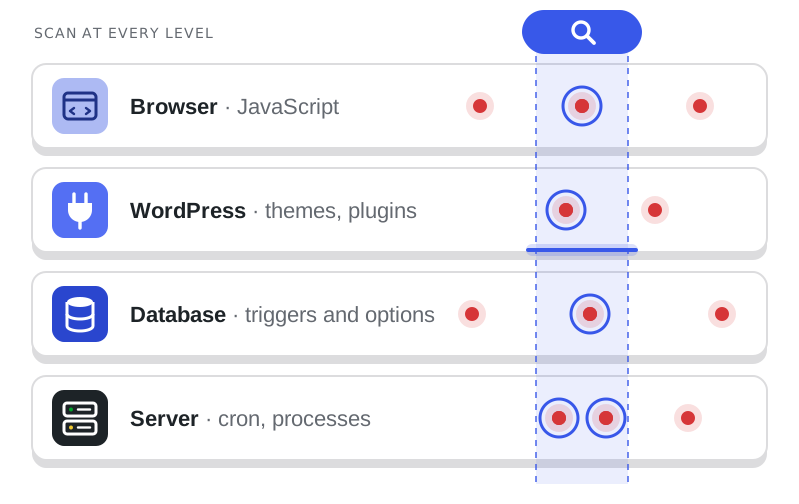
What you can’t read, you can’t find.
Modern malware hides behind chains of base64_decode, gzinflate, str_rot13 and eval, or inside files encrypted with ionCube, Zend Guard and SourceGuardian. A signature-based scanner recognizes known variants; our analysis system decodes the layers, compares encrypted files against the vendors’ original versions and flags whatever doesn’t match.
When a signature doesn’t exist yet.
A freshly exploited vulnerability isn’t in any database. That’s why we pair traditional tools with local open-weight AI models, such as Qwen and DeepSeek, which help us classify never-before-seen code and anomalous behavior. The final call always rests with an analyst: AI speeds up the investigation, it doesn’t replace it.
The entry point is written in the logs.
The access logs from Apache, NGINX and LiteSpeed, PHP-FPM errors and authentication logs tell how the attacker got in and what they did. We correlate them with file modification dates and suspicious queries to reconstruct the full chain, instead of just deleting its effects.
A clean site
on a compromised server.
On shared hosting and poorly configured VPSs, anyone who gains access to the system user can install cron jobs, start processes that survive deletion of their own executable, or modify the other sites in the same account.
The risk is declaring a cleanup finished while the persistence is still active: a PHP process left in memory, a cron job that re-downloads the backdoor, a trigger that rewrites your content. So we check processes, crontabs, timers, SSH keys and users, and verify over the following hours that nothing regenerates.
Further technical reading: WordPress hardening · MySQL triggers · crontab format.
Isolate, analyze.
Clean, verify.
Every job follows the same sequence, with guaranteed turnaround times. First we stop the damage, then we remove the infection and close the way in.
- 01ISOLATION
Contain
Forensic copy of the current state, blocking of suspicious access and securing of credentials.
- 02ANALYSIS
Investigate
Scan of files and database, review of cron jobs and processes, log analysis assisted by local AI.
- 03CLEANUP
Remove
Removal of every component of the infection and restoration of the original files, without losing content.
- 04VERIFICATION
Confirm
Hardening, closing the attack vector and monitoring to confirm the infection doesn’t regenerate.
The guaranteed time starts when we receive the necessary access: WordPress, database and hosting, or better yet, SSH. From that moment the work proceeds without interruption until the site is clean.
Fewer hours offline.
More trust.
An infected site costs you every hour: in sales, in search rankings and in the trust of the people who visit it.
Orders and payments
kept safe.
JavaScript skimmers on the checkout, redirects to fake stores, exposed customer accounts: on WooCommerce, an infection hits payments directly. We remove the malicious code, check the gateway and checkout templates, and review orders and users created during the compromise. The longer the site stays infected, the greater the risk to your customers.
SEO and reputation
to protect.
Injected spam pages, hidden links, redirects only on mobile or only for visitors coming from Google: these infections are designed to stay hidden from the site owner. We find them, remove them and help you request a review in Google Search Console, to recover traffic and visibility.
A secure site
is a credible one.
The “deceptive site” warning in the browser, emails blocked because your server is sending spam, the host suspending your account: for a business these are immediate reputation damage. We step in within guaranteed times to get the site back online, clean up the domain’s reputation and reduce the risk of it happening again.
Review times at Google and the blacklists depend on those services: we follow up for you, but they’re outside our control.
Infection removed.
Entry point closed.
Readable report.
Every cleanup ends with a clear write-up: what we found, what we removed and what changed.
Request a cleanup
- 01
Securing the site
Copy of the infected state for analysis, password, key and salt changes, blocking of suspicious access.
- 02
Application and server analysis
Files, database, cron jobs, processes, users and Apache, NGINX or LiteSpeed logs.
- 03
Complete cleanup
Removal of malware, backdoors, webshells, triggers and persistence; restoration of the original files.
- 04
Hardening and closing the entry point
Updates, permissions, web server configuration and a fix for the vulnerability that was exploited.
- 05
Report and monitoring
Technical write-up of the job and checks over the following hours to confirm the infection doesn’t return.
The reasons behind our method.
Since 2005, Managed Server has run servers and hosting for Italian businesses, agencies and publishers. Cleaning up compromised sites has always been part of our work: for years we did it for the customers on our own infrastructure, respecting the role of the developers and web agencies who look after their sites.
Today we offer that experience to anyone with an infected WordPress site, on any host. Our method starts from the attack vector and works down to the system: files, database, cron jobs, processes and logs, with the help of local AI models for what no signature knows yet. The goal isn’t to make a warning disappear, but to hand you back a clean site that’s harder to break into.
Choose your timeline.
The cleanup is guaranteed.
One method, three turnaround times. The price is fixed per WordPress installation and includes application and server analysis, cleanup, hardening and a report.
Within 24 hours
For infected sites that are still reachable
- Cleanup guaranteed within 24 hoursFrom receipt of access, Mon–Fri 9am–7pm Italian time (CET). Payment in advance.
- Analysis of files, themes, plugins and database
- Review of cron jobs, processes and system users
- Decoding of obfuscated and encrypted files
- Log analysis supported by local AI
- Closing the attack vector and hardening
- Technical report of the work done
choice
Within 12 hours
For business sites and live portals
- Cleanup guaranteed within 12 hoursFrom receipt of access, 7 days a week. Payment in advance.
- Priority handling
- Analysis of files, themes, plugins and database
- Review of cron jobs, processes and system users
- Decoding of obfuscated and encrypted files
- Log analysis supported by local AI
- Vector closure, hardening and report
Within 6 hours
For online stores and sites that can’t go down
- Cleanup guaranteed within 6 hoursFrom receipt of access, 7 days a week. Payment in advance.
- Immediate handling
- Analysis of files, themes, plugins and database
- Review of cron jobs, processes and system users
- Decoding of obfuscated and encrypted files
- Log analysis supported by local AI
- Vector closure, hardening and report
Amounts exclude VAT. The guaranteed time starts when we receive the necessary access (WordPress, database and hosting or SSH). For multisite, multiple installations on the same server, or infections spread across an entire hosting account, we prepare a dedicated quote before we begin.
Does your site show
these symptoms?
Many infections are designed to go unnoticed by the site owner. Do any of these sound familiar?

On mobile you land on another site.
Redirects to casinos, pharmacy spam or fake prizes, often only on smartphones or only for visitors coming from Google: from your own computer you see nothing.
Google warns that your site is dangerous.
The red Safe Browsing screen, a Search Console alert, or search results full of spam pages you never published.
The malware comes back after cleanup.
You reinstalled WordPress, deleted the suspicious files, ran the scanner. The next day the infected files are back.
Your host suspended the site.
The provider reports spam sending, abnormal processes or excessive CPU usage, and blocks the account until it’s cleaned.
Users and files you don’t recognize appear.
Administrators you never created, unknown plugins, PHP files in uploads or with names similar to WordPress ones, like wp-confg.php.
Let’s be straight with you.
Technical expertise and transparency, from the very first contact. Firm timelines and concrete answers, no false promises.

What does guaranteed cleanup in 6, 12 or 24 hours mean?
It means that within the time you choose, your site is free of the infection: malware, backdoors and persistence removed, site back online and working. The clock starts when we receive the access we need to work: WordPress, database and hosting, or better yet, SSH.
In the hours that follow we continue with monitoring and checks to confirm the infection doesn’t regenerate. If the analysis turns up anything outside the agreed scope, such as other compromised sites on the same account, we tell you right away, before going further.
Why does malware come back even after cleaning the site?
Because in almost every case the cleanup removed the effects but not the cause. The most common infections install persistence mechanisms: a system cron job that re-downloads the backdoor, a WP-Cron event, an SQL trigger that reinserts the code into your content, a PHP process that stays in memory even after its file is deleted.
On top of that there’s the entry point: if the vulnerable plugin or the compromised password stays, the attacker simply walks back in through the same door. That’s why we hunt down every persistence mechanism, at the application and server level, and close the vulnerability that was exploited.
What do you mean by server level?
Everything underneath WordPress: the operating system, the user the site runs as, crontabs, running processes, file permissions, SSH keys, the configuration of Apache, NGINX or LiteSpeed and of PHP-FPM, and the server logs.
A security plugin works from inside WordPress and can’t see any of this. Many developers and agencies, in turn, only have FTP or hosting control panel access. We work with SSH access when it’s available, just as we do every day on the servers we manage.
How do you use artificial intelligence? Is my data safe?
We use open-weight models, such as Qwen and DeepSeek, running locally on our own infrastructure. They help us analyze large volumes of logs, decode and classify obfuscated code, and spot anomalous behavior that doesn’t match known signatures, as happens with unclassified vectors and 0-days.
Your site’s files and logs are never sent to third-party AI services. AI is a tool that supports our analysts: every assessment and every removal is decided and verified by a person.
Do you also find files encrypted with ionCube, Zend Guard or SourceGuardian?
Yes. Many commercial plugins and themes legitimately use ionCube, Zend Guard or SourceGuardian to protect their code, and that’s exactly why encrypted files make an ideal hiding place: a scanner can’t read what’s inside.
Our analysis system identifies encoded and obfuscated files, even with chains of base64, gzinflate and eval, compares them against the original versions distributed by the vendors, and flags those that were modified or are out of place. An encrypted file that doesn’t belong to any installed product is a red flag.
Does the site stay online during the cleanup?
It depends on how serious it is. If the site is serving malware to visitors or stealing payment data, it may be necessary to put it into maintenance mode for the shortest time strictly needed: we propose it to you and decide together.
In other cases we work with the site online. Before any work, we take a full copy of the current state, which also helps with the forensic analysis, so every change stays reversible.
Will I lose content, orders or customizations?
No, it’s one of the principles of our method. We don’t resort to blind reinstalls or to restoring backups that are weeks old: we remove the malicious code and replace only the compromised files with their original versions.
Posts, pages, products, orders, legitimate users and customizations stay where they are. If a file contains both legitimate and malicious code, as often happens in custom themes, we clean it by hand.
Do you work with any hosting provider?
Yes: shared hosting, VPS, dedicated servers and cloud, with Apache, NGINX or LiteSpeed. With SSH access we extend the analysis to cron jobs, processes and system logs; with only FTP and control panel access we still work on files and database, and we tell you clearly which checks remain out of scope.
If the infection stems from hosting limitations, such as wrong permissions or different sites sharing the same system user, we flag it in the report along with recommended fixes.
Will you help me get off Google’s blacklists?
Yes. Once the cleanup is done, we guide you through the review request in Google Search Console and check the domain’s status on Google Safe Browsing and the main blacklists.
Review times depend on Google and the other services involved: they’re outside our control and are not part of the guaranteed cleanup time.
Can you work with my developer or web agency?
Yes. The people who know the site help us tell legitimate customizations from malicious changes. We share what we find and agree on how to handle work on the custom code.
Many agencies hand us the server and forensic side that falls outside their day-to-day work: we take care of the cleanup and closing the entry point, and they keep looking after the site.
How do I know the work was really done?
You get a technical report listing the infection components we found, where they were, how they were removed and which vector the attacker used, along with the hardening measures applied.
In the hours after the cleanup we check that no suspicious files, users or processes reappear. A report with concrete details is worth more than a scan that says “zero threats.”
How can I prevent a new infection?
The report lists the causes and recommended fixes: updates, plugins to replace, permissions, passwords and server configuration. The most urgent ones we already apply during hardening.
Many reinfections come down to neglected updates and reused credentials. If you want to tackle the problem at the root, Managed Server also offers managed WordPress hosting, with updates and monitoring handled by system administrators.
Is your site
infected?
Every hour counts: the malware keeps hitting visitors and customers, and Google, your host and the blacklists won’t wait. Choose a plan, pay online and share your access: the cleanup starts right away, at a fixed price and with guaranteed times.
Request a cleanupTakes you to the plans: cleanup within 6, 12 or 24 hours of receiving access.
Monday – Friday · 9:30am – 7:30pm Italian time (CET)
Contact us at managedserver.it ↗